


Launching a fitness studio is an exciting journey, but it can also feel overwhelming. After securing the perfect space, setting up equipment, and hiring staff, you might wonder: How do I attract members? How many classes should I schedule? What systems do I need in place?
Enter vibefam, your all-in-one, budget-friendly fitness booking solution to manage your studio efficiently. Designed to simplify your studio management, vibefam lets you focus on what truly matters—growing your business. To make the most of your first 30 days on our platform, we’ve prepared this comprehensive checklist to set your studio up for success.
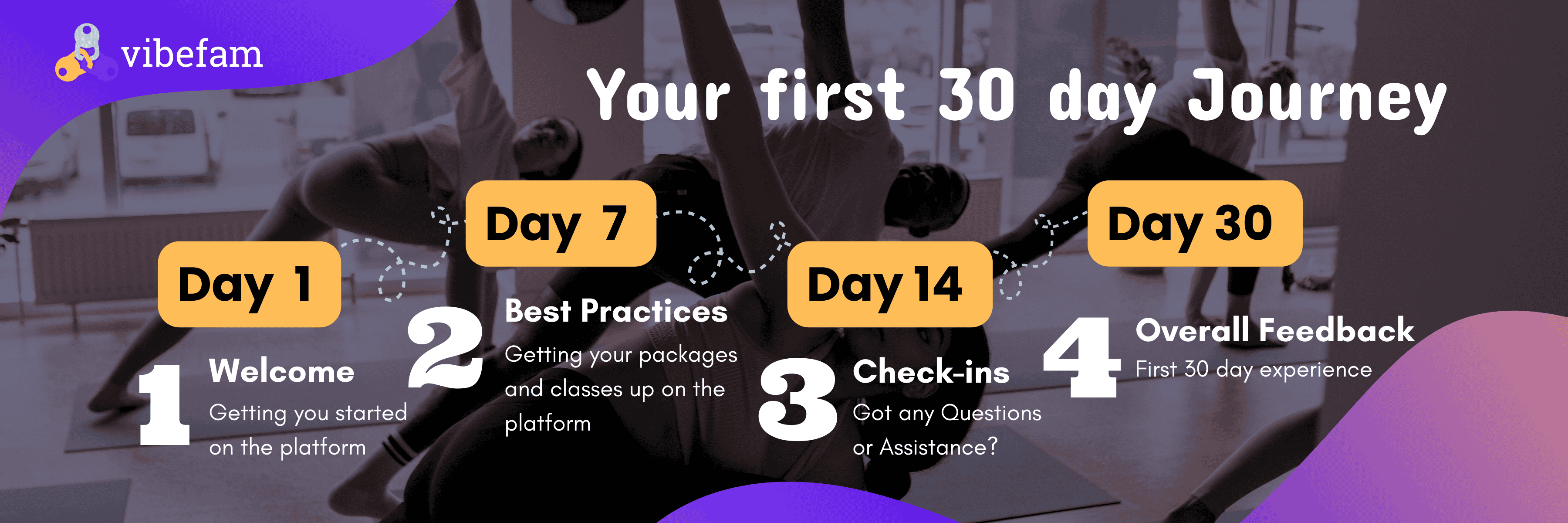

Day 1 – 14: Setting the Foundation ✅
Your journey with vibefam begins here—welcome aboard! Contrary to popular belief, setting up a booking system from scratch need not be a daunting and overly complicated task. With vibefam, setting up your studio essentials can take you as little as one day.
1. Completing the Onboarding Checklist
Start by creating your vibefam studio admin account using our signup link. This step kicks off the setup process, allowing you to configure key elements of your booking platform like studio details, class types, schedules, and packages.
For a step-by-step guide to configuring your studio essentials, visit our onboarding checklist. Once this is done, the rest of your journey becomes even smoother!
2. Migrate 100% of your Staff and Instructors to the System
The next step would be the setting up of staff accounts for your studio admin and instructors (if applicable) for easy access to the system, and also for payroll checking purposes. To do so, you can refer to our guide here!
Similarly, we have written a guide for your staff and instructors to guide them on the final steps of the sign up process. Do note that the system interface may look different for yours, your admins and instructors, depending on the access rights that you have provided them with!
In the meantime, you could also take some time to set up staff payrolls to streamline calculations at month-end.
3. Set Up ClassPass Integration (if applicable)
If your studio is currently on ClassPass, vibefam makes integration easy. Submit a migration request with your venue ID, and ClassPass will handle the rest.
To learn how to enable ClassPass spots for your classes, refer to our ClassPass integration guide.
As for studios that are not on ClassPass, we highly recommend that you take this into consideration, especially if your studio is first starting out – it could be a wonderful tool for you to gain customers that you might not have access to without getting on the platform!
Read more about how ClassPass can boost your fitness studio in our blog here
4. Set Up Meta Integration (if applicable)
For studios using vibefam’s lead management feature, ensure proper setup to capture lead sources effectively.
On your vibefam dashboard, navigate to “Leads Capture and Sources”. Select the sources you’d like to capture leads from and follow the integration steps to get started. We recommend spending some time configuring these integrations to ensure leads flow seamlessly into the system.
Thinking of adding lead management to your existing subscription? Check out our blog on how this feature can help maximise your fitness studio sales.
5. Migrate 100% of your Members into the System
Switching to vibefam from platforms like Mindbody or Glofox? We’ve got you covered. Seamlessly migrate your member details and active packages error-free in just hours.
Not convinced? Refer to our member migration guide to see how simple it is to do it yourself!
After the migration, your members will receive an email confirming that their packages have been successfully migrated to our system. All they have to do is download the vibefam app on Google Play or the App Store and create an account.
Note: If your studio subscribed to an Individual Branded App, clients will be required to download your studios custom app instead
For more details, refer to our detailed members guide, designed to ensure a seamless user experience on the vibefam platform.
6. Launch an Email Marketing Campaign
Email campaigns are a powerful yet often overlooked tool for follow ups, in order to acquire and convert more potential clients into paying customers. On vibefam, you can easily customise your own emails with our templates and simplified email design tools. With just a few clicks, you are on your way to building stronger connections with your customers.
7. List Merchandise for Sale to Increase Revenue Streams
Selling company merchandise could be a great way to diversify your fitness studio revenue streams. Everyone loves cute and practical business merchandise. Whether it’s resistance bands, grip socks, or branded apparel, consider listing them on your vibefam booking platform. Your clients will love having these extras conveniently available on the same platform.
Day 14 – 30: Going Live with vibefam 🚀
With your setup complete, it’s time to launch your booking system and introduce it to your clients. During this period, encourage your staff to familiarise themselves with the platform and assist members as they navigate the app.
At vibefam, we pride ourselves on exceptional customer support. If you encounter any issues, schedule a call with our customer specialist here, or submit a support ticket for quick assistance.
After your first 30 days on vibefam, we’ll reach out to gather your feedback and ensure everything is running smoothly. Your insights are essential in helping us refine our features to better support your studio’s unique needs!
Conclusion: Share the Love 💜
We hope that this comprehensive checklist helps you feel confident and prepared to make the most of your first 30 days on vibefam. Starting a fitness studio is no small feat, but with the right tools and guidance, you’re already on track to success.
And remember— good things are meant to be shared! If you know someone who could benefit from vibefam, refer them to us. Our referral program rewards both of you with $100 for every successful conversion.
Contact your account manager today to get started with this exciting deal!