

If you are a dance studio owner or manager looking for software that truly understands your business, you might have grown tired of generic “top 10” roundups that list features without judging how they work for dance studios. Many of those lists highlight online booking as a checkbox but do not dig into what dance studios actually need. In this guide, you will discover what real studios want, what other articles are missing, and why Vibefam might just be the best choice for studios in Singapore and Asia that want seamless booking, smarter scheduling, and local payment options.


What Online Booking Should Actually Mean for a Dance Studio
Online booking is not just about getting parents or students to sign up for classes. It is about making that process smooth, intuitive, and aligned with how dance studios operate. Many articles gloss over terms like “family accounts” or “waitlist backfill,” but the truth is that studios run into frustrations when that word-of-mouth registration fails or admin gets complicated. Online booking needs to support multiple students under one family account with parents approving permissions and handling sibling discounts without duplicating effort. It also needs to handle a mix of term classes, workshops, drop-ins, and make-up credits that parents and students will want to manage without support tickets or spreadsheets. Ideally bookings are automatically updated, waitlists fill in when space opens up, and cancellations and make-ups are tracked clearly. So instead of just listing “booking feature exists”, we should ask: how friendly is the family checkout flow? Can make-up credits be used within the policy? Does the system auto-allocate waitlist spaces? Most lists do not answer these questions, but they matter for smooth operations.Families, Minors and Consent Made Simple
A great studio software should let a parent create an account and add multiple children under that account. A single checkout should handle siblings registering for different classes across terms or sessions. Parents should be able to see consent forms or health waivers, acknowledge them once and apply them to all children. Few review sites mention this nuance. Many studios struggle to manage parental consent or get multiple siblings checked out smoothly online. If parents have to fill in details several times, frustration rises and some drop off. By contrast, a tool that makes this seamless reduces admin and increases conversion.Term Courses, Workshops, and Make-ups Without Admin Chaos
Dance studios do not operate purely by drop-in classes. Many programs run on an eight or twelve-week term. There are workshops, intensives, holiday boot camps, trial days, and occasional drop-ins. When a student misses a class, make-up policies vary: some allow the same week, others allow make-ups to be used later. Without intelligent booking logic, admin staff have to chase credits, rebook lessons manually, or call parents. Articles seldom explore whether software makes this easy. The right tool allows a studio to configure rules by term, allow automatic credit application, and show available make-up slots. This saves staff hours, reduces confusion, and improves parent experience.Payments That Reduce Drop-off Not Just Support Cards
Yes, many software platforms say they support online payments. But if your studio is in Singapore, Malaysia, or other parts of Asia, international credit card gateways can be a registration barrier. You might lose families who do not have cards, or worry about fraud or PCI compliance. That is why having local payment options like PayNow or GrabPay matters. Most generic lists overlook this entirely. Vibefam offers PayNow and GrabPay as payment options for dance studios. That means parents can pay instantly using familiar apps on their phone. That ease reduces drop-offs, gets revenue faster, and eliminates manual reconciliation. When articles lump all forms of “online payment” together, they do not reflect how payment friction can silently harm conversions. If families can pay using local methods they trust, you will see fewer abandoned registrations and higher recurring attendance.
The Features Dance Studios Compare During Trials
When studio owners sit in demos, they ask specific questions. Not whether the software “can do booking” but how well it handles real scenarios. Here are the kinds of questions pairs should ask themselves when trialling software.Mobile Booking and Branded App Adoption
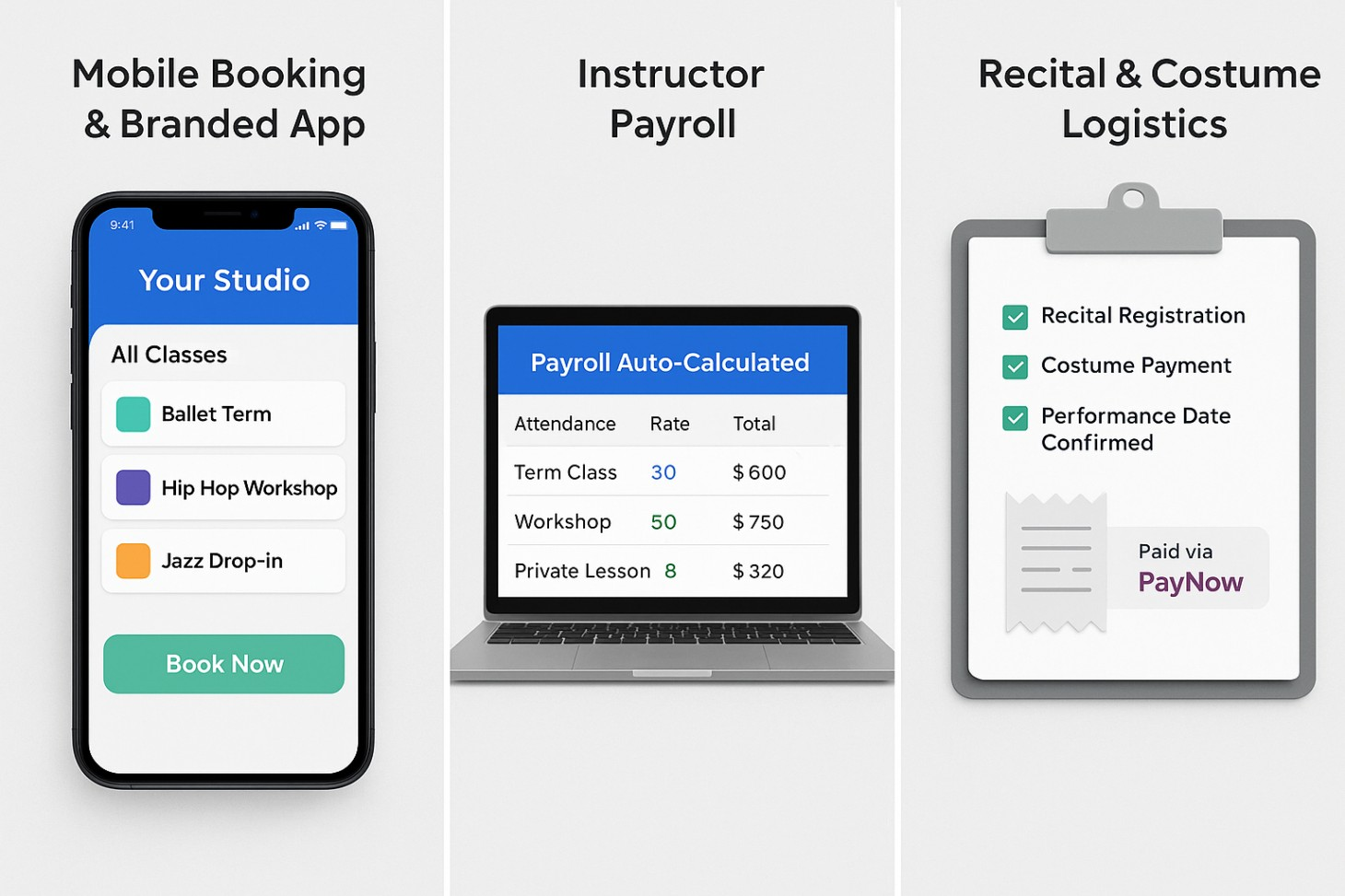
In today’s world, many parents and students book classes using their phones. The experience must be clear, frictionless, and fast. Some platforms simply list “mobile app available” without indicating whether it is intuitive or how it handles enrollment, passes, notifications, and payments. Vibefam offers a real mobile app experience. Studios can offer a branded app where families can browse classes, book, make payments, track make-ups, and receive push reminders. That kind of consistency in experience matters for retention and brand recognition. When your family can manage everything via your app, they are more likely to keep coming back instead of hopping to competitors.Adoption of Payroll That Matches How You Teach
Dance instructors are often paid per class or per head, sometimes with different rates for workshops, term classes, and private lessons. Many scheduling tools skip this altogether and assume flat payroll or manual adjustments. That leads to payroll complexity and time wasted reconciling attendance. Vibefam links attendance with payroll. You set rates per class type, and when attendance is recorded, the payroll report is generated for easy export. That enables staff to focus on teaching rather than crunching spreadsheets. Most articles ignore this feature because they do not ask the deep operational questions.
Why Vibefam Fits Dance Studios That Care About Bookings and Growth
You want software that reduces friction, saves hours of admin, and helps grow bookings reliably. Vibefam offers a suite of features shaped by dance operations that other lists overlook.Fast Family-Friendly Booking and Flexible Schedules
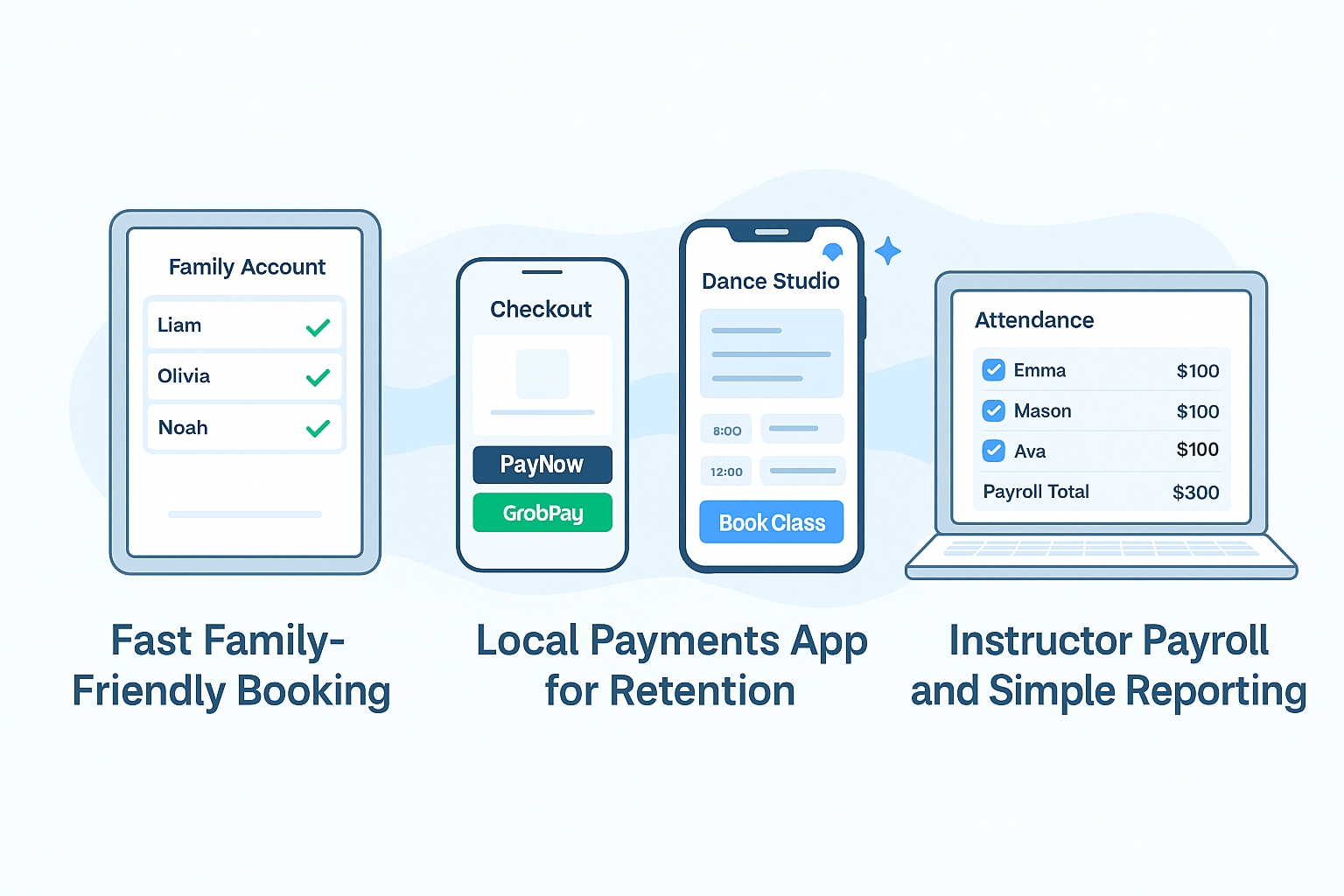
Vibefam supports sibling registrations under a single account, handles parental consent smoothly, and makes it easy for families to book term classes, workshops, or drop-in sessions in one cart. It supports automatic waitlist backfill and make-up logic, so when a student requests a make-up, the system can present available classes without manual intervention. By capturing these workflows natively, Vibefam reduces studio admin significantly. Families engage more, fewer calls are needed, and staff can focus on teaching.Local Payments That Convert
By supporting familiar payment rails like PayNow and GrabPay, Vibefam removes unnecessary friction at checkout. Parents feel comfortable paying instantly in their local apps. That clarity increases registrations and cash flow and avoids complicated cross-border payment reconciliation. Having this built in is rare and unloved by most generic roundups.Branded Mobile App for Retention
When you offer a branded app, your students and parents stay within your ecosystem. They receive push reminders, can check schedules or make-up balances, and can book or buy passes on the go. That keeps your studio top of mind. Generic directories talk about “mobile access” but do not evaluate how personalised and intuitive the app experience is. Vibefam gives studios a real mobile tool that families use day-to-day.Instructor Payroll and Simple Reporting
Attendance directly feeds into payroll calculations. You can set rates for term classes, per-head workshop fees, or private lesson rates. When you export a payroll report, it ties back to actual attendance automatically. You do not have to cross-reference booking logs or class registers. That is a level of integration most listicles never mention, but it is a game-changer for staff efficiency.Proof from Studios Using Vibefam
If you visit Vibefam’s dance studio page, you will see examples of real studios that use it successfully. They talk about how registration dropped from 40 minutes of admin per family to a few clicks. They discuss seamless recital sign-ups and reduced payment friction. That kind of real feedback increases confidence when assessing new software. If you want to see how Vibefam can streamline your studio operations and grow your bookings, sign up for a free trial of the software today or contact the team to request a personalised demo. If Vibefam ticks all those boxes, then it belongs at the top of your short list. If you would like to see Vibefam in action in your studio, you can contact the team to arrange a demo or start a free trial today.Implementation Playbook: How to Launch Online Booking in 10 Days
Day 1: Start by importing your class schedule and defining term dates. Configure your course types (terms, workshops, drop-ins) and set your make-up rules and cancellation policies. Getting this foundation right ensures your clients will see accurate availability. Day 2: Set up family accounts and test sibling enrolment. Make sure consent forms and waiver flows are working correctly. Walk through the checkout flow as a parent would and adjust copy where needed. Day 3: Connect PayNow and GrabPay so payments are local and instant. Run a test transaction to verify that everything lines up with your bank or payment processor. Day 4: Set up auto waitlist backfill so if a class is full, families can join a queue and be automatically slotted in when space opens. Day 5: Enable the mobile app or branded app add-on. Invite staff or a small group of parents to install it and test push notifications, mobile booking, and access to make-up credit balances. Day 6: Configure payroll logic by setting rates for your different class types. Record sample attendance and export a payroll report to ensure it matches your expectations. Day 7: Collect parent feedback from your test group. Ask about the entire flow—from sibling booking to payment to make-ups. Make final tweaks to schedules or messaging. Day 8: Go live. Send an announcement to all families that booking is now online, payments can be made via PayNow and GrabPay, and the mobile app is available. Day 9: Monitor registrations, waitlists, and payment completion. Address any questions in real time. Day 10: Review the first week’s data. Look at how many bookings are coming in, how payments are processed, and how many make-ups were used. Refine messaging or terms if needed. Following this playbook means you can launch quickly without admin stress.
Decision Checklist for Studio Owners
- Your software offers seamless family accounts and consent flows.
- You can configure term logic, make-up credits, workshops, and drop-ins within one system.
- Payments support local options like PayNow or GrabPay.
- There is a branded mobile app that gives families control over bookings and reminders.
- Payroll aligns with your class and instructor payment structure.
- Support is responsive, especially when you’re switching on new features or onboarding families.