

Vibefam publishes this guide and competes with all six platforms in it. We read each vendor's own help centre and product pages on 6 November 2026 and used only what they document. Capterra and G2 ratings were read the same day. We recommend Vibefam, and we report each platform's settings as its own help pages describe them.
Our verdict
- Our pick: Vibefam. You control the Waitlist Lock Period and the late-cancel window together, with join-order promotion and Vibefam Spot Maps for reformer and cycle rooms.
- Mindbody: studios on two-way SMS that want members claiming spots by text.
- Glofox: studios that want the waitlist to stop promoting early, up to 10 hours before class.
- WellnessLiving and Mariana Tek: studios that want a switch to stop charging promoted members.
- Arketa and Momence: studios that charge at promotion, or want members to opt in first.
What class scheduling software should do when a spot opens
It's 5:40 on a Monday. The 6pm reformer class is full, eight people are on the waitlist, and someone cancels. Your front desk is busy checking in the 5:45 class.
The right software fills that bed and applies your late-cancel rule before anyone at the desk looks up. Our pick is Vibefam. It promotes the next member in join order and stops at a Waitlist Lock Period you set. Late-cancel rules sit in its scheduling tools, per class type.
Mindbody, ABC Glofox (Glofox), WellnessLiving, Mariana Tek, Arketa and Momence automate waitlists too. Five jobs separate them:
- Fill a freed spot from the waitlist without a staff click.
- Stop promoting at a point before class that you choose.
- Enforce your late-cancel window.
- Charge a fee or deduct a credit for late cancels and no-shows, by the rules you set.
- Let staff waive a fee and return the credit in one step.
Two terms matter here. A late-cancel window is the period before class when cancelling costs the member a credit or a fee. An auto-promotion cutoff is the point after which the software stops moving people off the waitlist. Vibefam calls it the Waitlist Lock Period.

How seven class scheduling platforms handle waitlists and late cancels
All seven can move a member off the waitlist without a staff click, according to their own help centres on 6 November 2026. What differs is where promotion stops, whether the member says yes first, and who pays if she then cancels.
| Platform | Waitlist promotion | Where auto-promotion stops | Late cancel and no-show | Spot booking |
|---|---|---|---|---|
| Mindbody | Auto-add in join order, or First to Claim by text, first reply wins (needs two-way SMS) [source] | Stops inside a "waitlist lock window"; no duration published [source] | Late-cancel fee charged automatically under your policy; appointments become no-shows 10 minutes after start [source] | Client Pick-a-Spot on Accelerate and Ultimate, not Starter [source] |
| Glofox | Automatic (needs Pay later on), or notify the whole waitlist and the first to book wins [source] | 30 minutes before class by default; 30 minutes to 10 hours per location since July 2026 [source] | Fees applied automatically; 24 hours to review and waive [source]; one-step waive and return credit since September 2026 [source] | Room map in the member app; may auto-assign a spot if the member doesn't pick [source] |
| WellnessLiving | Auto-promote in join order, confirm mode, or Fastest Response (first to respond) [source] | A cutoff you set; Fastest Response defaults to 1 hour before class [source] | Window you set; $ or % fee; threshold penalties; account flag; a setting for charging promoted clients [source] | Book-a-Spot for equipment and positions [source] |
| Mariana Tek | Waitlist and Standby reservations [source] | Not stated on the pages we read [source] | Lose the credit, charge a fee, both or neither [source]; no appointment penalties yet [source] | Clients pick their spot and a guest's spot [source] |
| Arketa | Moves the next client in and takes payment; skips anyone it can't charge or over their booking limit [source] | A close window you set, at least 30 minutes recommended; optional credit hold on joining [source] | Policies processed automatically once a day [source]; credit returned inside the window only if Return credit is ticked [source] | Promoted client gets the first available spot [source] |
| Momence | First Come First Serve, Double Opt-in (10 minutes to reply) or Fast Fingers First [source] | A cutoff you set, after which no one is notified [source] | Auto-charge for classes and appointments [source]; percentage or flat-plus-percentage fees since August 2026 [source] | Customers choose a spot when signing up [source] |
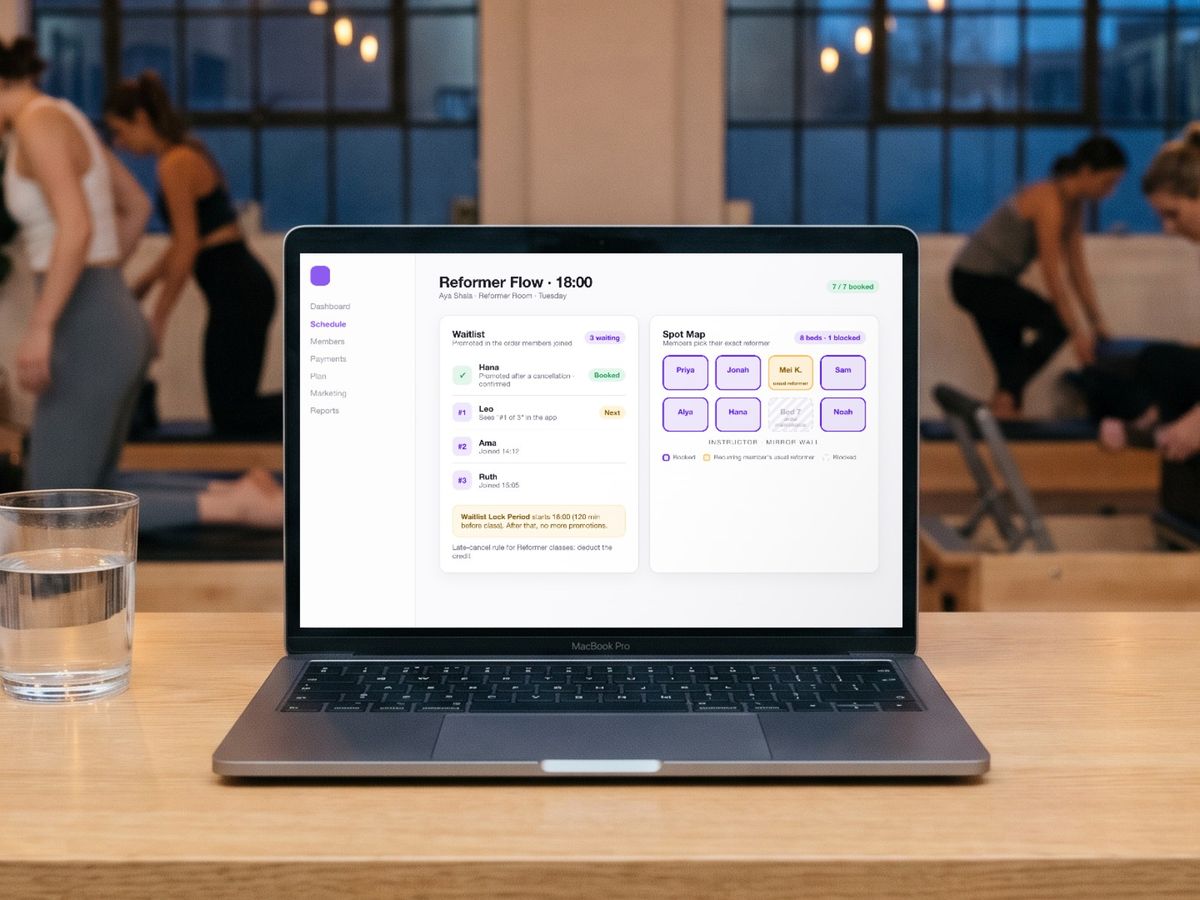
| Vibefam | Join order [source]; members see their queue position [source]; email and in-app, SMS if enabled*; no credit or card: a set time to pay* | Waitlist Lock Period you set in minutes before class, 120 by default; a cancel inside it isn't backfilled [source] | Window per class type [source], as short as you need*; fee, credit or strike rules automatic; a promoted member who cancels inside it is charged* | Vibefam Spot Maps: exact reformer, bike or mat; beds under maintenance blocked; usual spot carried forward; a promoted member gets the open spot, or picks if several are free* [source] |
- Confirmed by Vibefam's product team, 10 November 2026.
Mindbody
- Best for: studios on two-way SMS that like members claiming freed spots by text.
- Watch out for: Client Pick-a-Spot isn't on the $79 Starter plan (Mindbody pricing), and the lock window's length isn't published.
Glofox
- Best for: studios that want the waitlist to stop promoting early, up to 10 hours before class.
- Watch out for: the default cutoff is 30 minutes, and automatic promotion needs Pay later switched on.
WellnessLiving
- Best for: studios that want a switch to stop charging promoted members, plus a confirm step.
- Watch out for: one setting decides whether a promoted client is charged the moment she's booked.
Mariana Tek
- Best for: studios that sell Waitlist and Standby as two different bookings.
- Watch out for: Standby reservations follow every normal penalty rule, and appointments have no penalty fees yet.
Arketa
- Best for: studios that want payment taken at the moment of promotion.
- Watch out for: anyone it can't charge is skipped, and policies are processed once a day.
Momence
- Best for: drop-in studios that want members to opt in, with 10 minutes to reply.
- Watch out for: a member with no credits isn't charged by card unless you turn that setting on.
Pricing and contracts sit in Mindbody vs Glofox vs WellnessLiving; switching is in Vibefam vs Mindbody.
Can a member promoted off the waitlist land in your late-cancel fee window?
Yes, if the waitlist keeps promoting after your late-cancel window has opened. A promoted member can then owe a fee for a spot she didn't pick. Glofox's July 2026 update lets studios move the cutoff up to 10 hours before class. It says that means "fewer late-fee disputes caused by a cutoff that sits too close to class time".
A 4pm promotion, seen from the front desk
Say your late-cancel window is 12 hours and you keep Glofox's default cutoff of 30 minutes. A member joined the 6pm waitlist last night. At 4pm someone cancels, and the software books her in.
She's at work and sees the confirmation at 5:30. She can't make it, so she cancels. Your system charges the late fee on a spot she never chose that day. Next morning she's at your front desk asking why.
That's an 11.5-hour band, from 12 hours out to 30 minutes out, where every promotion lands in the fee zone. Push the cutoff to Glofox's 10-hour maximum and the band shrinks to two hours.
Fees add up. Studios on Mariana Tek collected $42.8 million in penalty fees in 2025, by its own count.
How each platform closes the gap
Mariana Tek never penalises waitlisted customers, though Standby reservations follow every normal rule. WellnessLiving has a setting that stops charging a client the moment she's promoted. She then pays only when staff charge her.
Momence's Double Opt-in gives the member 10 minutes to say yes. Glofox leans on the waiver. It has a 24-hour review window and, since its September 2026 updates, one step to waive the fee and return the credit.

What Vibefam does, and the setting that avoids the fee
On Vibefam, a member promoted inside your late-cancel window is charged under your policy if she then cancels. You control both numbers.
The late-cancel window is set per class type, as short as you need, even under an hour. The Waitlist Lock Period is set in minutes before class, 120 by default, as our waitlist walkthrough shows.
Our rule on any platform: stop promotion at or before the moment your late-cancel window opens. On Vibefam, a 2-hour late-cancel window with the default 120-minute lock does exactly that.
Most studios use a longer window than that, some 12 to 24 hours. Whatever yours is, set both numbers on one class during your trial and check them side by side. You also decide whether a late cancel returns the credit.
Which waitlist mode suits your studio's format?
Match the mode to how members pay. Credit and membership studios (many yoga, Pilates and barre rooms) suit automatic promotion in join order. Members already hold a balance to book with. Arketa can also hold a credit when someone joins.
Drop-in studios, like many dance and martial arts schools, carry more risk. A promoted drop-in may not have planned to come. So check whether the member has to say yes before she's booked.
Mindbody's First to Claim needs two-way SMS, and Momence offers Double Opt-in. On any platform, a cutoff at or before the start of your late-cancel window keeps a promoted drop-in out of the fee zone.
Reformer, cycle and Lagree rooms need one more answer: which spot does the promoted member get? Arketa gives her the first available spot in the room, as our Arketa vs Mindbody comparison notes. Glofox may auto-assign one before class if she hasn't picked.
On Vibefam, the open spot is selected for her automatically. If more than one is free, she can pick her own.
Spot-based classes: how Vibefam fills a freed reformer
A member cancels tomorrow's 7am reformer class at 9pm tonight. Vibefam books the next member on the waitlist in join order, straight away. She hears by email and in-app, or by SMS if you've switched it on.
Everyone still waiting sees their place in the queue from the moment they join. Promotion stops when your Waitlist Lock Period starts. A cancel inside the lock still gets your cancellation policy, but the bed isn't backfilled. The waitlist walkthrough shows each step.
What if the next member has no credit or card on file? Vibefam notifies her to pay within a set time. If she doesn't, the next eligible member with card details on file is prioritised.
Vibefam Spot Maps run the room. You upload the floor plan once, and capacity is set per bed. A reformer out for maintenance is blocked, and a recurring member's usual reformer carries forward week to week. Our reformer studio software page shows the setup.
A Pilates instructor reviewing Vibefam on Capterra put the result in one line.
"Nothing gets crossed or double-booked, which matters more than people realise once you're running several class types at once."
Pilates instructor, Capterra review
Five questions to ask in every class scheduling software demo
Ask every vendor these five questions, us included. Have them answer on screen with one of your real classes set up. A spoken yes is easy. A cutoff and a late-cancel window configured side by side is proof.
- If a spot opens two hours before class, who gets it, and how is she told?
- What happens to a waitlisted member with no credit or no card on file?
- Can a member promoted inside my late-cancel window be charged if she cancels? Can I switch that off?
- Can staff waive a fee and return the credit in one step? Does the waiver show in the member's history?
- Do the same rules cover private appointments?
Mariana Tek's penalty fees don't cover appointments yet. Momence's rules cover both classes and appointments.
For the policy itself, our guides on reducing last-minute cancellations and the real cost of no-shows help you set the window and the fee.
Why Vibefam is our pick for independent and growing boutique studios
We recommend Vibefam to yoga, Pilates, reformer, cycle, barre and dance studios in North America and Asia-Pacific. It fills freed spots and settles late cancels without staff stepping in.
- Built for boutique operators: Vibefam is designed around class-based fitness and wellness businesses, not generic gym chains. Vibefam Spot Maps book the exact reformer or bike, and late-cancel rules are set per class type.
- Easy to start, ready to scale: every plan comes with a Studio Success Manager and a one-hour onboarding call. Our Great Value plan already covers up to two locations, so opening your second studio doesn't mean a new system.
- Powerful without unnecessary complexity: scheduling, waitlists, payments, payroll and marketing run in one place, without multiple disconnected tools. On the Most Popular and Professional plans, ClassPass bookings sync straight into the same schedule.
One Pilates in Singapore moved to Vibefam after a major scheduling issue on its previous booking system.
"I feel Vibefam's system tackles the core problems business owners faced and makes everything so much smoother."
Dong Ying, Founder, One Pilates, Singapore
Sync Cycle, an indoor cycling studio also in Singapore, felt it on the cost line.
"It cuts down my operations cost, which is very important for a boutique studio like Sync Cycle."
Carol, Sync Cycle, Singapore
An owner reviewing Vibefam on G2 described the daily routine.
"I can see my class schedule, check who's booked in, and mark attendance in just a few clicks."
Owner, G2 review
Vibefam holds 4.9 out of 5 on Capterra from 93 reviews and 4.9 on G2 from 56. It's comprehensive software across operations and marketing, and the waitlist is where you'll feel it first.
Monday morning: open your current scheduler. Write down your late-cancel window and your waitlist cutoff. Then check whether a promoted member can land between them.
Next, start the 7-day free trial and set up your busiest class with a Waitlist Lock Period. Or book a demo and we'll walk that class through it with you before the new-year rush.
Sources
All checked on 6 November 2026. Vibefam's late-cancel, no-credit and notification settings were confirmed by our product team on 10 November 2026.
- Waitlist improvements (Mindbody): https://www.mindbodyonline.com/business/education/product-waitlist-improvements
- Scheduling (Mindbody): https://www.mindbodyonline.com/business/scheduling
- Pricing (Mindbody): https://www.mindbodyonline.com/business/pricing
- Waitlist settings (ABC Glofox): https://support.glofox.com/hc/en-us/articles/46477329605524
- July 2026 product updates (ABC Glofox): https://support.glofox.com/hc/en-us/articles/52403792471572-July-2026-Product-Updates
- Protect your revenue with new fees, 28 January 2026 (ABC Glofox): https://www.glofox.com/blog/protect-your-revenue-with-new-fees/
- September 2026 product updates (ABC Glofox): https://www.glofox.com/blog/abc-glofox-september-2026-product-updates/
- Spot Booking (ABC Glofox): https://support.glofox.com/hc/en-us/articles/46429462554644-Spot-Booking
- Business policy settings (WellnessLiving): https://help.wellnessliving.com/en/articles/9642413-business-policy-settings
- Book-a-Spot (WellnessLiving): https://www.wellnessliving.com/features/book-a-spot/
- What is a standby reservation (Mariana Tek): https://support.marianatek.com/en/articles/1985865-what-is-a-standby-reservation
- What are penalty fees (Mariana Tek): https://support.marianatek.com/en/articles/5154749-what-are-penalty-fees
- Reservation statuses (Mariana Tek): https://support.marianatek.com/en/articles/5154721-what-are-the-statuses-that-can-be-associated-with-a-reservation
- Are penalty fees available for appointments (Mariana Tek): https://support.marianatek.com/en/articles/15000515-are-penalty-fees-available-for-appointments
- Business management features (Mariana Tek): https://www.marianatek.com/features/business-management/
- Automatic waitlist (Arketa): https://help.arketa.com/schedule/waitlist/automatic-waitlist
- Waitlist credits (Arketa): https://help.arketa.com/settings/booking/waitlist-credits
- No-show and late cancel settings (Arketa): https://help.arketa.com/settings/booking/no-show-late-cancel
- Late cancel and no-show (Arketa): https://help.arketa.com/schedule/checkin/late-cancel-no-show
- How each waitlist setting works (Momence): https://help.momence.com/en/articles/9222610-how-does-each-waitlist-setting-work
- Customers out of credits on the waitlist (Momence): https://help.momence.com/en/articles/9176082-if-customers-run-out-of-credits-can-t-join-class-off-the-waitlist-shouldn-t-the-customer-s-card-on-file-be-charged
- Feature updates, 15 November 2024 (Momence): https://momence.substack.com/p/feature-updates-easily-change-class
- Percentage late-cancel and no-show rules, 9 August 2026 (Momence): https://intercom.help/momence/en/articles/12558127-late-cancellation-no-show-rules-now-allow-you-to-charge-percentages-of-the-service-price
- Spot selection in classes (Momence): https://help.momence.com/en/articles/8417934-spot-selection-in-classes
- How to manage class waitlists with Vibefam (Vibefam): https://vibefam.com/how-to-manage-class-waitlists-with-vibefam/
- Waitlist automation (Vibefam): https://vibefam.com/features/waitlist-automation/
- Scheduling (Vibefam): https://vibefam.com/features/scheduling/
- Reformer Pilates studio software (Vibefam): https://vibefam.com/reformer-pilates-studio-software/
- Pricing (Vibefam): https://www.vibefam.com/pricing/
- Vibefam reviews (Capterra): https://www.capterra.com/p/218462/vibefam/reviews/
- Vibefam reviews (G2): https://www.g2.com/products/vibefam/reviews